
Become a Billionaire Redeem Codes in Shop
PC and mobile steps, case-sensitive strings, and how codes differ from Forever Pack.
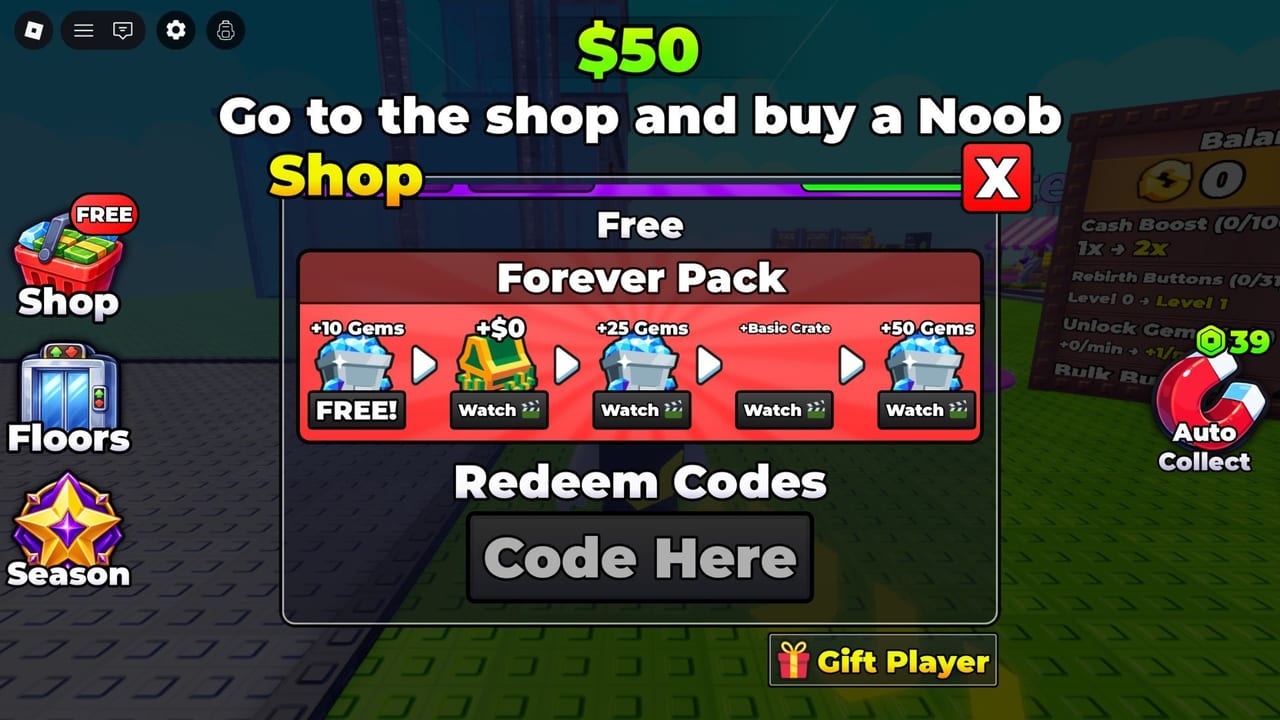
Become a Billionaire hides promo codes in Shop, not in a chat command and not on the Rebirth board. If you joined after the 8 May 2026 launch, you can redeem on the same character you use to place units and collect cash. Servers hold six players with separate bases, so a friend cannot redeem UPDATELOG on your plot. This page is the button-by-button path for PC and mobile, plus the mistakes that waste a working string.
The live list lives on Codes Hub. Dead or unverified August 2026 strings sit on expired codes. If you have not placed a first character yet, skim Getting Started after you redeem so the RNG Rolls do not sit unused.
Find Shop on the left
The Shop button is on the left side of the HUD. It is the same panel that sells characters, not a separate codes app. Open it, then scroll. You will pass character offers, Forever Pack, Gift Player, the Auto Collect gamepass (about 39 Robux), Floors, and Season before you reach Redeem Codes. The codes box is easy to miss if you stop at Forever Pack.
Forever Pack is not a code. It is an ad and crate panel that can grant Gems, a $0 claim, or a Basic Crate. Typing UPDATELOG into Forever Pack does nothing. Gift Player sends items to another account. Auto Collect only auto-picks cash. None of those controls paste a promo string.
Redeem on PC
- Join Become a Billionaire and wait until your base HUD finishes loading. Offline cash can pop in first; that is normal.
- Click the Shop button on the left.
- Scroll until the Redeem Codes block is fully on screen. The input label is “Code Here”.
- Click the field, paste the code with Ctrl+V, and check that no space landed in front or behind the string.
- Press Enter. A success toast should credit RNG Rolls. A fail toast usually means a typo, a dead code, or a code you already used on this account.
Do not press random Shop purchases while the field is focused. Character buys and the codes box are neighbors. If the game eats a click, reopen Shop and find Redeem Codes again rather than assuming the code failed.
Copy from Codes Hub instead of typing from memory. CommunityServer is the code that players mistype most often because of the capital S.
Redeem on mobile
- Thumb the Shop button on the left. Landscape helps if the HUD is cramped.
- Drag the Shop list until Redeem Codes is visible. Avoid opening Forever Pack by accident.
- Tap “Code Here”. If the Roblox keyboard covers the field, scroll once more so you can see what you paste.
- Paste. Mobile keyboards love to insert a trailing space or auto-capitalize. Delete extras until the string matches the table exactly.
- Tap Enter / Return / the on-screen confirm. Wait for the reward toast before you close Shop.
If paste is blocked, type the code slowly. Codes are case-sensitive: FREEROLLS is not Freerolls. UPDATELOG is not UpdateLog. After a failed attempt, clear the field fully before the next try so a leftover character does not ride along.
Case sensitivity and other failure cases
Become a Billionaire does not fold codes to lowercase. Treat every capital as required.
- Extra space before or after the code.
- Letter O versus digit 0. Current working codes do not use digits, which removes that trap for UPDATELOG, CommunityServer, and FREEROLLS.
- Redeeming on the wrong account. Codes are per Roblox account, not per base slot and not per server.
- Redeeming a string from expired codes such as New_Update, FREE83, or GULLIBLE. Those showed up in 22 August 2026 lists and should be treated as expired or unverified unless they return to the working table.
- Confusing Forever Pack claims with codes. Watching an ad for Gems does not consume UPDATELOG, and UPDATELOG does not fill Forever Pack.
You can redeem all three working codes on the same account for 30 RNG Rolls total. Order does not matter. You cannot redeem the same code twice for a double payout.
What to do after the rolls credit
RNG Rolls spend on crates. Crates can drop Totems. Merge still needs five of the same character plus Gems. Codes do not place units, collect cash, or press Rebirth. After you redeem:
- Open crates while you are at the base, not while you are browsing Season.
- Place new characters and keep collecting. Offline cash exists, but a crate burst is wasted if nothing is producing.
- Rebirth when the cash wall hits, then spend rebirth points on Cash Boost, Rebirth Buttons, or Gems Per Minute — not on hoping another code appears.
If the toast succeeds but you cannot find the rolls, re-open Shop, leave the codes box, and check crate UI. Do not spam the same code; you will only trigger an already-used error.
When the field itself is missing
Rare patches shuffle Shop order. Scroll the full list before you assume codes were removed. If Redeem Codes is gone after an update, wait for the next note on Codes Hub rather than buying random packs. Codes have been a Shop scroll target since launch, not a chat command.
This walkthrough will not change the rewards. It only gets the string into “Code Here” without a typo. Keep the working table and this page open together on a second screen if you are redeeming on a phone with a tiny keyboard.
Frequently Asked Questions
Quick answers to the most common questions.
Where is the redeem box in Become a Billionaire?
Open the Shop button on the left of the HUD, scroll to Redeem Codes, and paste into the field labeled "Code Here". Then press Enter. Full list: Codes Hub.
Can I redeem codes on mobile?
Yes. The left Shop path is the same on touch. Watch for auto-capitalization and trailing spaces. Codes are case-sensitive on every device.
Is Forever Pack the same as redeeming a code?
No. Forever Pack is an ad and crate panel for Gems, a $0 claim, or a Basic Crate. Promo codes such as FREEROLLS only work in Redeem Codes.
Why does a code that looks correct still fail?
Usually a hidden space, a wrong capital, a code you already used, or an expired string from expired codes. Paste from the working table instead of typing.