
Controls and HUD in Become a Billionaire
Shop, Floors, Season, Balance board, portal, crates, and merge on mobile and PC.
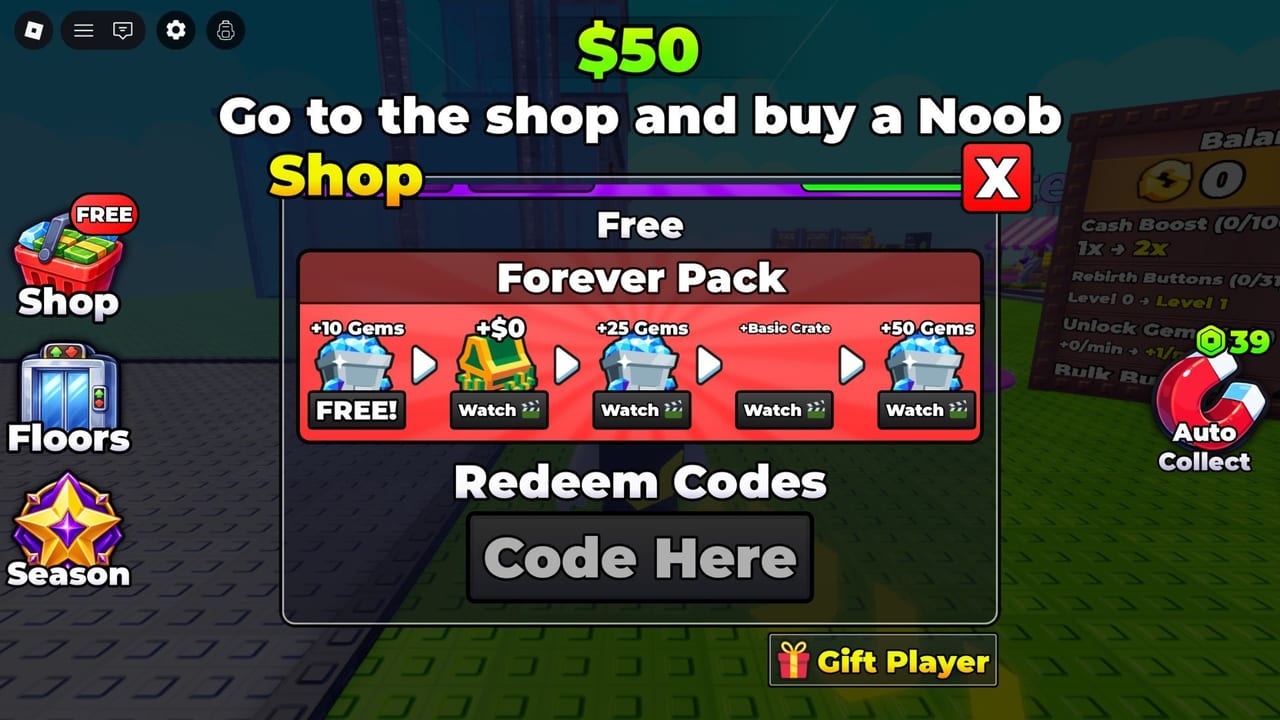
Become a Billionaire is a third-person Roblox tycoon, not a hidden-menu simulator. You walk a character around a 6-player map, press HUD buttons, and interact with pads on your private plot. This page names the September 2026 HUD from a real screenshot, then maps Shop, Floors, Season, the Balance board, Auto Collect, the rebirth portal, the crate ring, and the merge machine. Use Getting Started for the first-hour plan; this page is the button legend.
Movement is standard Roblox: WASD or thumb stick, jump, camera drag. There is no split-screen. Other players have their own bases. If a prompt does nothing, walk closer to the object before you assume a gamepass lock.
Left HUD: Shop, Floors, Season
Three stacked buttons sit on the left.
Shop is the top entry and often shows a FREE badge during the tutorial. The onboarding line is “Go to the shop and buy a Noob” with $50 on screen. Inside Shop you buy cash characters, see Robux rows, open the Forever Pack ad list (+10 Gems, +$0, +25 Gems, +Basic Crate, +50 Gems), redeem codes in a field labeled Code Here, and find Gift Player. Code steps live on how to redeem.
Floors uses an elevator icon. Extra floors cost rebirth points and add pads. Do not tap Floors hoping it is a free income cheat. It is space. Space with no units is still zero cash.
Season is a timed track next to Floors. It is not required to place a Noob or to rebirth. Open it when you have spare attention, not when the tutorial is still pointing at Shop.
Right HUD: the Balance board
The right board is the account sheet:
- Cash Boost (0/100) shown as 1x toward 2x. This is a rebirth-point upgrade, not a Shop tile.
- Rebirth Buttons. Extra buttons for buying more points per visit.
- Unlock Gems +0/min. Passive Gem income from rebirth points.
- Bulk Buy. Buys several copies of the current Shop unit in one click so you can fill pads or feed the merge machine.
None of those four rows place a character. They only change how fast cash, points, Gems, or purchases happen. If Cash Boost is 1x and pads are empty, the board is not the problem. Buy a Noob.
Auto Collect, placing units, collecting cash
Auto Collect is a gamepass at about 39 Robux. Without it you walk through the bills your units print. With it the pickup is automatic while you are in the server. It does not place units, it does not rebirth, and it does not run offline. Place a unit by buying it in Shop and setting it on an empty pad on your plot. Collect by walking the plot or by owning Auto Collect. That is the entire local loop.
World objects: portal, crates, merge
The rebirth portal stands on the plot. Walk into it, spend cash for points, reset the run. It is not a HUD button. If you cannot find it, rotate the camera until the plot edge is visible instead of mashing Shop.
Crates sit at map center: Basic, Rare, Epic, Legendary, Premium. You leave your plot, walk the shared middle, spend Gems, wait out any timer, then bring a totem home. The merge machine sits on one side of the map. Five identical characters plus Gems go in; a stronger gold (and later diamond) copy comes out. Both systems are written up in Merge and Crates. This page only cares that you can walk there.
Mobile versus PC
On PC, keep the camera high enough to see the elevator icon, the portal, and at least one pad in the same glance. Click Shop, Floors, and Season on the left; read the Balance board on the right; click world objects in the 3D scene. On mobile, thumbs cover the right board if you hold the camera too low. Rotate until Cash Boost and Bulk Buy are fully visible before you buy. The left stack can sit under a joystick; nudge the stick inward so Shop stays tappable. Touch the portal, crate pads, and merge machine the same way you touch any Roblox proximity prompt.
There is no separate mobile Shop. Forever Pack ads, Code Here, and Gift Player are the same menus. If a menu is off-screen, close it and reopen Shop rather than assuming the feature is PC-only.
When a button does nothing
If a button does nothing, walk closer to the plot before you assume a gamepass is required. Shop needs you near the counter, rebirth needs the portal, crates need the center pads, and merge needs the machine. On mobile, rotate until the Balance board is fully visible so Cash Boost and Bulk Buy are not hiding under a thumb. On PC, keep the camera high enough to see both the elevator icon and the portal in one glance. A FREE badge on Shop is a tutorial hint, not a broken unlock. A grey Rebirth Button row means you have not bought that upgrade yet, not that the HUD is hidden. Learn the six locations (Shop, Floors, Season, Balance board, portal, crate-and-merge) and the rest of the wiki reads faster.
Frequently Asked Questions
Quick answers to the most common questions.
Where is Shop on the Become a Billionaire HUD?
Left stack, often with a FREE badge during the tutorial. It holds character buys, Forever Pack ads, Code Here, and Gift Player.
What does Auto Collect do?
It picks up printed cash automatically for about 39 Robux while you are in the server. It does not place units, rebirth, or generate offline cash.
Where do I redeem codes?
Inside Shop, in the field labeled Code Here. Follow how to redeem if a code fails.
Is the HUD different on mobile?
Same buttons, smaller screen. Rotate so the Balance board is not under your thumb and keep Shop clear of the joystick.